Rendering
Maximum Image Size
Cheetah 3D is currently limited to rendering 5000x5000 pixel images.
Note: needs checking in Cheetah 3D 8.1.1: is the maximum render size still 5000x5000?
Network Rendering
Because 3D rendering is easily parallelized (i.e. split into multiple independent tasks) an obvious way to accelerate rendering is to use more computers. Cheetah 3D currently lacks support for network rendering, but you can easily take advantage of a few extra computers by simply splitting animations into separate segments and rendering them on separate computers.
Note: needs checking in Cheetah 3D 8.1.1: does it still lack network rendering?
CUDA, OpenCL, GPU-Accelerated Rendering
Even the cheapest modern computers have a GPU — graphics processing unit — which is a very powerful parallel processor. Recently, CUDA and OpenCL have emerged as competing mechanisms for allowing programmers to use GPUs to perform calculations for their programs. Certain kinds of calculations (and rendering algorithms are a good example) are well-suited to being performed by parallel processors, so there is a revolution taking place in GPU-accelerated rendering.
Right now, CUDA is more mature (and several very good CUDA-based renderers are already on the market) but is tied to NVidia’s graphics chips. Since many Macs do not use NVidia graphics chips, this is not very helpful for developers of Mac software. OpenCL promises to be vendor-neutral, but trails CUDA in terms of functionality (even so, some OpenCL accelerated renderers have started to appear).
Note: requires updating for Cheetah 3D 8.1.1: this section predates Apple’s move to Metal and Apple Silicon (OpenCL is deprecated on macOS); whether Falcon uses the GPU needs checking (manual: Falcon says nothing either way).
Unbiased Rendering, Physically-Based Rendering
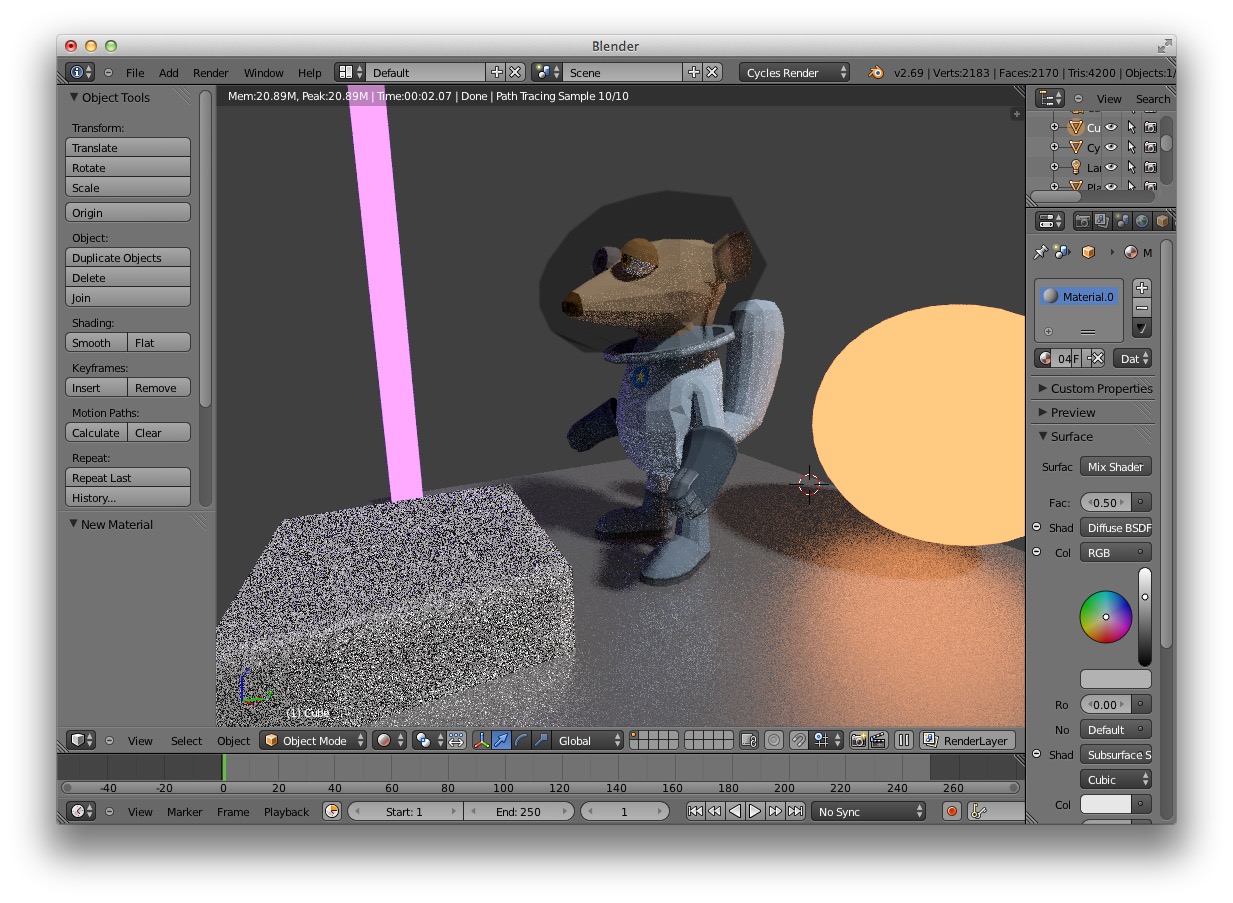
Blender's Cycles renderer in action
You may have heard of “unbiased” or Physically Based Renderers such as Blender's Cycles, Luxrender (which is an open source unbiased renderer based on code written by the computer scientists who invented unbiased rendering), Maxwell Render, Indigo, Octane, and so on. What these renderers do is randomly shoot photons out of light sources and figure out which ones get to the image being rendered. This is “unbiased” in the sense that it gives every photon an equal chance of contributing to the image, whereas raytracers are biased towards the photons that can be easily determined to reach the view port.
Unbiased rendering involves generating a lot of photons that will not affect the image being rendered, but has the virtue of making many aspects of ray tracing that are very difficult to do correctly “just work”. (The chief way of improving the performance of unbiased renderers is quickly figuring out which photons can be ignored.) E.g. you get caustics and radiosity “for free” with this approach. The major downside to this approach is that there’s no upper bound on rendering time (because you’re randomly sampling photons, you may never get all the photons needed to reach a given level of quality for a specific pixel in the output image).
Does this matter to Cheetah 3D Users?
AI draft: generated from the Cheetah 3D 8.1.1 manual; not yet reviewed by the author.
Yes. Since version 7.0, Cheetah 3D has two renderers: the original Cheetah raytracer and Falcon, an unbiased path tracer, which is where future development is focused. You choose the renderer with Render > Renderer or by clicking and holding the Renderer toolbar icon.
Falcon behaves just as described above. Its Samples setting is the number of paths traced per pixel: more samples means less noise and longer renders, and setting Samples to zero makes Falcon keep refining until you stop the render yourself. Its Ray depth settings limit the number of diffuse, glossy, and specular bounces per path. Falcon also handles reflective caustics, depth of field, and motion blur, and offers a Filmic tone mapping option for a more realistic look.
The Cheetah renderer also uses techniques similar to unbiased rendering for depth of field, soft shadows, blurred reflections, and blurred transparency, which is why those effects can be noisy.
End of AI draft.
Note: the old LuxCheetah exporter script (forum thread) was last confirmed for Cheetah 3D 5.5, and LuxRender has since become LuxCoreRender; this paragraph was cut from the draft above.
God-Rays, Volumetrics
Volumetrics are mostly-but-not-quite transparent substances such as airborne dust, swirling mist, and smoke. They allow you to render “god ray” effects and other nice visuals.
Cheetah 3D does not currently implement volumetrics.
Note: Cheetah 3D 8.1.1 also has a Fog object (Cheetah renderer only; manual: Fog), not yet covered here.
Vector Motion Blur
Motion blur is the effect you get when you photograph a moving object — because a camera makes images by capturing light over a period of time, an object moving significantly during that period will appear blurred. When an image is rendered by a computer it will tend to be razor sharp, and motion blur has to be added deliberately. There are a number of ways of doing this including vector motion blur and rendering a bunch of extra frames and averaging them together.
AI draft: generated from the Cheetah 3D 8.1.1 manual; not yet reviewed by the author.
Cheetah 3D’s Falcon renderer has built-in motion blur. It can blur camera motion, object transformations, and mesh deformations (e.g. skeletal animation), each of which you can turn on or off in the render settings, and the strength of the blur is set mainly by the camera’s shutter time. At the moment motion blur only works when rendering animations. With the Cheetah renderer you can still render an animation at a high frame rate and blend the frames together (see Faking Motion Blur).
End of AI draft.